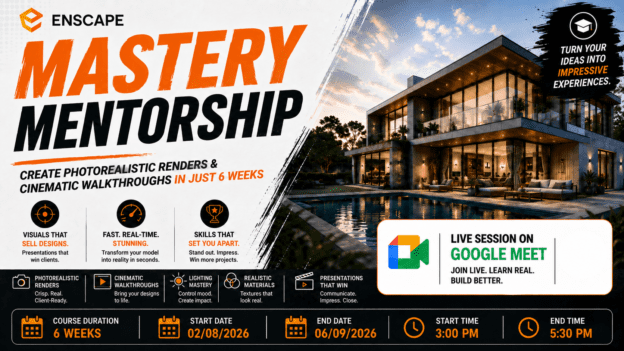
Enscape Mastery Mentorship: Create Photorealistic Renders & Cinematic Walkthroughs in Just 6 Weeks

About Course
What If Your Designs Looked So Real… Clients Thought They Were Already Built?
Imagine this:
You send a design to a client…
And instead of confusion, questions, or hesitation…
They immediately say:
“This looks incredible. When can we start?”
No long explanations.
No back-and-forth.
No trying to “convince” them.
Because your visuals do the selling for you.
Here’s the Problem Most Designers Face
Right now, you might be:
- Showing flat, lifeless renders that don’t capture your vision
- Struggling to communicate your ideas clearly to clients
- Spending hours tweaking visuals… with average results
- Watching others create stunning renders—and wondering how they do it
And the truth is…
It’s not your design skills holding you back.
It’s how you present them.
Because In Today’s World…
Great design isn’t enough.
If your work doesn’t look impressive…
It gets overlooked.
Now Imagine This Instead…
You open your model in Enscape…
And within seconds…
You’re walking through a fully rendered, photorealistic space.
- Natural light pours through windows
- Materials look real—wood, glass, concrete, all alive
- Shadows, reflections, atmosphere… perfectly balanced
And with a few clicks…
You create:
- Stunning high-end renders
- Smooth cinematic walkthroughs
- Immersive client presentations
All without leaving your design software.
Introducing:
Enscape Mastery Bootcamp — Create Photorealistic Renders & Cinematic Walkthroughs in Just 6 Weeks
This is not another generic rendering course.
This is a focused, results-driven bootcamp designed to help you turn any model into visuals that sell.
Here’s What Makes This Different
You’re not wasting time learning modeling again.
👉 You start with a ready-made project
👉 And focus 100% on what actually matters:
- Visual quality
- Realism
- Storytelling
- Client presentation
Because that’s what gets you noticed.
What Happens When You Join
Over 6 weeks, you’ll attend live 2.5-hour sessions where you’ll:
- Watch real-time demonstrations
- Apply techniques instantly on your own project
- Ask questions and get immediate feedback
- Build a complete, portfolio-ready presentation
No guessing.
No confusion.
Just guided progress every step of the way.
What You’ll Be Able To Do After This Bootcamp
By the end, you won’t just “use Enscape”…
You’ll be able to:
- Transform any model into photorealistic renders
- Create realistic materials that don’t look flat or fake
- Master lighting to control mood and atmosphere
- Compose shots that look professional and intentional
- Produce high-quality images and walkthrough animations
- Present your work in a way that wins client confidence instantly
Why This Skill Changes Everything for You
When your visuals improve…
Everything else follows:
- Clients understand your ideas faster
- Your work stands out instantly
- You look more professional
- You win more approvals
Because people don’t buy drawings…
They buy what they can see and feel.
The Cost of Staying Where You Are
If you keep doing what you’re doing now…
Your designs may stay the same quality…
But your perceived value won’t improve.
And in a competitive industry…
Perception is everything.
Or You Can Decide Today…
To turn your designs into visuals that:
- Grab attention
- Build trust
- Close deals
👉 Join the Enscape Mastery Bootcamp Today
In just 6 weeks…
You can go from basic visuals…
To client-winning presentations that speak for themselves.
Course Content
Week 1: Enscape Fundamentals + Project Setup
Enscape Fundamentals + Project Setup
Week 2: Materials That Look Real (Not Default)
Week 3: Lighting Mastery (Game Changer)
Week 4: Composition, Camera & Scene Creation
Week 5: Rendering + Animation + Walkthroughs
WEEK 6: Presentation & Professional Workflow
Earn a certificate
Add this certificate to your resume to demonstrate your skills & increase your chances of getting noticed.