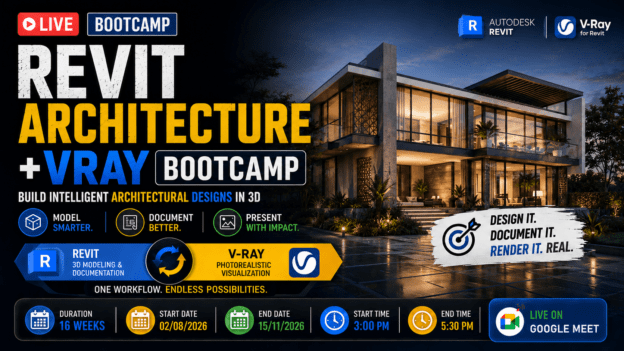
The Ultimate Revit + V-Ray Bootcamp: From 3D Modeling to Photorealistic Architectural Visuals
About Course
What If You Could Design, Document… and Render an Entire Building—All in One Powerful Workflow?
Imagine this:
You start with a blank screen…
And step-by-step, you build a complete architectural project—
Walls. Floors. Roof. Interiors. Documentation.
Then… with a few clicks…
That same model transforms into a photorealistic visual so real, it looks like a finished building.
No switching between complicated tools.
No messy workflows.
No guesswork.
Just one smooth, professional pipeline from idea → model → presentation.
Here’s the Reality Most Contractors Face Today
You might already be:
- Learning Revit… but only scratching the surface
- Creating models… but struggling to present them convincingly
- Jumping between software… wasting time and losing accuracy
- Producing visuals that don’t match the quality of your designs
And the result?
Your work doesn’t get the attention—or respect—it deserves.
Because in Today’s Industry…
It’s not enough to just design.
You need to:
- Model intelligently
- Document professionally
- And present your ideas visually
That’s what separates beginners… from professionals.
Now Imagine This Instead…
You open Autodesk Revit…
And confidently build a complete, data-rich 3D model of your project.
Every element is accurate.
Every detail is intentional.
Every drawing is automatically generated.
Then…
You switch to V-Ray for Revit interface within Revit…
And suddenly—
- Light behaves like real sunlight
- Materials look rich and lifelike
- Spaces feel immersive and believable
Your design doesn’t just exist…
It comes alive.
Introducing:
The Ultimate Revit + V-Ray Bootcamp: From 3D Modeling to Photorealistic Architectural Visuals
This isn’t just a course.
It’s a complete transformation system designed to take you from beginner—or intermediate…
To someone who can confidently design, document, and present a full architectural project.
What Makes This Bootcamp Different?
Most programs teach you pieces.
👉 This teaches you the entire workflow from start to finish
You won’t just learn tools…
You’ll learn how to think and work like a professional.
Here’s What You’ll Be Able To Do By The End
You won’t just “know Revit” or “try V-Ray”…
You’ll be able to:
- Build a complete architectural model from real drawings
- Create floors, walls, roofs, interiors, and structural elements
- Produce professional sections, elevations, and documentation
- Generate sheets, schedules, and presentation drawings
- Transform your model into photorealistic renders
- Apply realistic materials, lighting, and environments
- Create high-end visuals that impress clients instantly
Step-by-Step… You Build Real Skills
This program is designed for progression—not overwhelm
Phase 1: Master Revit (Weeks 1–10)
You’ll go from beginner to confident modeler:
- Set up real projects from drawings
- Build complete architectural structures
- Design interiors and exteriors
- Create professional documentation and sheets
By the end of this phase…
You’ll have a fully modeled, real-world duplex project.
Phase 2: Master V-Ray for Revit (Weeks 11–17)
Then you take that same project…
And turn it into something extraordinary:
- Apply photorealistic materials
- Master lighting (interior & exterior)
- Set up professional camera compositions
- Render high-quality images efficiently
- Polish visuals with post-processing
Now your project doesn’t just exist…
It looks real.
Why This Skillset Changes Everything for You
When you combine BIM modeling + high-end visualization…
You become someone who can:
- Design with accuracy
- Communicate with clarity
- Present with impact
And that’s rare.
Which Means…
- You stand out faster
- You gain more confidence in your work
- You open doors to better opportunities
Because you’re no longer just creating drawings…
You’re delivering complete architectural experiences.
Who This Is For
This bootcamp is perfect for you if:
- You want to master Revit from the ground up
- You want to create stunning, photorealistic renders
- You’re tired of learning software in disconnected pieces
- You want a complete, real-world skillset
The Cost of Not Learning This
If you keep going the way you are…
You risk:
- Staying stuck at basic skill levels
- Struggling to present your ideas effectively
- Being overlooked in a competitive industry
Because today…
Skill alone isn’t enough.
👉 You need presentation power
Or You Can Decide Today…
To master a workflow that lets you:
- Design smarter
- Work faster
- Present better
👉 Join The Ultimate Revit + V-Ray Bootcamp Today
Commit to this program…
And walk away with a skillset that takes you from:
Basic modeling → Professional architectural visualization
Course Content
WEEK 1 — Revit Orientation + Project Setup
Revit Orientation + Project Setup
Assignment 1
WEEK 2 — Grids, Walls & Structural Layout
WEEK 3 — Floors, Doors, Windows & Sections
WEEK 4 — First Floor + Interior Design
WEEK 5 — Exterior Detailing + Finishes
WEEK 6 — Stairs, Railings & Vertical Circulation
WEEK 7 — Roof, Ceiling, Lighting & Site
WEEK 8 — Sections, Elevations And; Documentation
WEEK 9 — Sheets, Schedules & Rendering
WEEK 10 — Capstone Project + Bonus Skills
WEEK 11 — Foundations: Revit + V-Ray Workflow
WEEK 12 — Materials Mastery (Realism Starts Here)
WEEK 13 — Lighting Fundamentals (Interior & Exterior)
WEEK 14 — Cameras & Composition
WEEK 15 — Rendering Settings & Optimization
WEEK 16 — Post-Processing & Presentation
Earn a certificate
Add this certificate to your resume to demonstrate your skills & increase your chances of getting noticed.