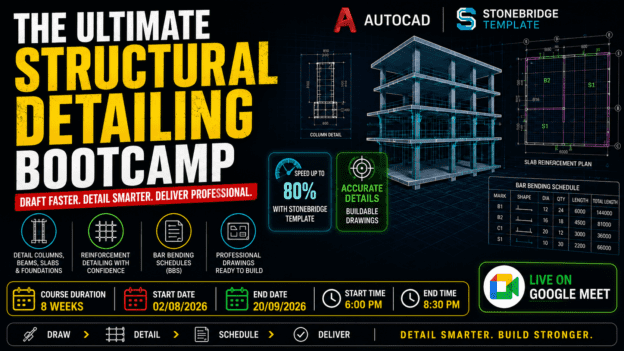
The Ultimate Structural Detailing Bootcamp: Master AutoCAD & StoneBridge for Fast, Professional Drawings
About Course
What if you could turn complex structural designs… into clean, professional drawings in a fraction of the time?
Right now, you might understand structural design.
You’ve seen beam schedules.
Column details.
Reinforcement layouts.
But when it comes to actually producing detailed drawings?
It feels slow. Confusing. Overwhelming.
Here’s the reality most people don’t talk about:
Structural detailing is where projects are won or lost.
Because no matter how good a design is…
If the drawings aren’t clear, accurate, and buildable — the project fails.
And that’s why skilled detailers are in high demand.
But there’s a problem…
Most people are either:
❌ Struggling with AutoCAD basics
❌ Spending hours drawing manually
❌ Unsure how reinforcement detailing really works
❌ Producing drawings that don’t meet professional standards
Or worse…
They rely on software outputs… without knowing how to convert them into real construction drawings.
Now imagine this instead…
You receive a structural design.
And within a short time, you confidently:
✔ Convert it into detailed drawings
✔ Add accurate reinforcement with proper annotations
✔ Create clean, standardized layouts
✔ Generate Bar Bending Schedules (BBS)
✔ Deliver a full drawing set ready for construction
Fast. Efficient. Professional.
Introducing: The Ultimate Structural Detailing Bootcamp
This is not just an AutoCAD course.
This is a complete, practical training system designed to teach you how structural detailing is done in the real world.
Using:
- AutoCAD — the industry standard for drafting
- StoneBridge Template — a powerful automation tool that can reduce your workload by up to 80%
Why This Bootcamp is Different
Most courses teach commands.
Some teach theory.
Very few teach speed + accuracy + real workflow.
This bootcamp does all three.
You won’t just learn how to draw…
You’ll learn how to produce professional drawings efficiently — the skill employers and clients actually pay for.
What You’ll Be Able to Do
By the end of this bootcamp, you’ll be able to:
✔ Detail columns, beams, slabs, and foundations with confidence
✔ Understand reinforcement logic and apply it correctly
✔ Use AutoCAD efficiently with proper layers, styles, and standards
✔ Automate detailing workflows using the StoneBridge Template
✔ Create clean, organized, and professional drawing sheets
✔ Generate accurate Bar Bending Schedules (BBS)
✔ Compile full structural drawing sets ready for construction
Learn By Doing — Not Just Watching
This is a hands-on bootcamp.
Every week, you’ll work on practical exercises and real drawings.
You won’t just follow along…
You’ll build your own detailing project step-by-step.
Who This Is For
This bootcamp is perfect for:
- Civil & structural engineering students
- Graduate engineers
- AutoCAD drafters
- Structural designers
- Anyone who wants job-ready detailing skills
By The End of This Bootcamp…
You won’t just “know AutoCAD.”
You’ll have:
✔ Real structural detailing skills
✔ A complete project for your portfolio
✔ A faster, more efficient workflow
✔ The confidence to take on real detailing work
The Real Advantage
When you master structural detailing…
You become more than a designer.
You become someone who can translate design into reality.
And in construction…
That’s one of the most valuable skills you can have.
Ready to Work Faster and Smarter?
If you’re tired of slow, confusing workflows…
And you want to create professional structural drawings with speed and confidence…
Then this is your opportunity.
Join The Ultimate Structural Detailing Bootcamp today — and start producing drawings that are not just accurate… but truly professional.
Course Content
Week 1: Introduction + AutoCAD Fundamentals for Structural Detailing
Introduction + AutoCAD Fundamentals for Structural Detailing
Week 2: AutoCAD Intermediate + StoneBridge Setup
Week 3: Column Detailing (Core Skill)
Week 4: Beam Detailing (High-Demand Skill)
Week 5: Slab Detailing + Speed Techniques
Week 6: Foundation Detailing
Week 7: Bar Bending Schedule (BBS) + Project Compilation
Week 8: Final Project + Real-World Workflow
Earn a certificate
Add this certificate to your resume to demonstrate your skills & increase your chances of getting noticed.