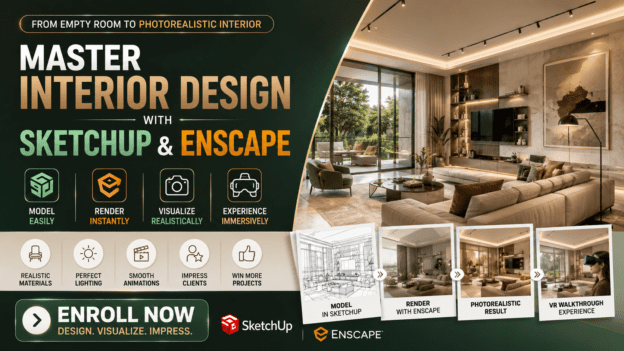
From Empty Room to Photorealistic Interior: SketchUp & Enscape Mastery

About Course
Imagine this: your client walks into your office. You open your laptop, and in seconds, you show them a fully realistic 3D model of their space. They don’t just nod politely—they gasp, smile, and immediately see exactly what you envisioned.
That’s the power of SketchUp + Enscape, and it’s exactly what I’m going to teach you in my Master Interior Design with SketchUp and Enscape course.
Because here’s the truth:
SketchUp lets you create 2D and 3D models easily, even if you’ve never been a “tech wizard.”
Enscape turns those models into photorealistic renderings, animations, and virtual reality walkthroughs instantly.
Together, they give you the ability to show, not just tell, your clients exactly what their space will look like—before a single wall is painted.
If you’ve ever struggled with clients not “seeing” your vision, or spent hours trying to explain layouts and materials… this course will change the game for you.
Here’s What You’ll Learn Inside the Course:
SketchUp from scratch: Build rooms, furniture, and custom designs with ease.
Real-time rendering with Enscape: Transform your models into immersive, photorealistic visualizations.
Virtual reality walkthroughs: Let clients “walk through” their future spaces, making approvals faster and smoother.
Materials, lighting, and textures: Make your designs feel real and emotional, not flat and lifeless.
Time-saving workflows: Stop wasting hours tweaking renders—get professional results instantly.
By the end of this course, you won’t just be designing interiors—you’ll be selling experiences. Your clients will feel the space before it exists, and they’ll be excited to sign off on your designs immediately.
Why This Course Is Different
Unlike generic tutorials that leave you stuck figuring things out on your own, this course is step-by-step, practical, and results-driven. You’ll follow exactly how I take a blank room in SketchUp and turn it into a high-quality, client-ready visualization in Enscape.
Plus, everything is taught with you in mind—even if you’ve never modeled in 3D before. By the time you finish, you’ll have the skills to:
Impress clients with realistic visualizations
Win more projects
Spend less time on revisions
Command higher fees because your work looks professional and polished
Bonus: Insider Tips That Only Professionals Know
I’ll show you shortcuts and workflow hacks I’ve used to save hours while delivering breathtaking designs. These are the tricks most designers only learn after years of trial and error. You’ll get them on day one.
Take Action Now
Seats in this course are limited because I want to give personalized guidance and make sure every student succeeds.
Don’t let another project slip through your fingers because clients can’t see your vision. You deserve to turn ideas into stunning realities—and finally get the recognition and fees your talent deserves.
Click the button below to join Master Interior Design with SketchUp and Enscape and start impressing your clients today.
Transform your designs. Transform your business. Transform your client’s experience.
ENROLL NOW
P.S. Remember, the difference between a designer who gets hired and one who just pitches ideas is what clients can see. With SketchUp and Enscape, you’ll make your vision unmistakably real. Don’t wait—your clients are ready to be wowed.
Course Content
WEEK 1— SketchUp Intro, Interface & Basic Tools
WEEK 2 — Importing & Managing 2D Floor Plans
WEEK 3 — Core Interior Modeling
WEEK 4 — Materials, Textures & Custom Finishes
WEEK 5 — Lighting Fundamentals for Interior Design
WEEK 6 — Enscape Setup & Configuration
WEEK 7 — Rendering & Visualization
Earn a certificate
Add this certificate to your resume to demonstrate your skills & increase your chances of getting noticed.